The analyses and opinions presented on Career Cloud are our own. We may receive commissions from purchases made after visiting links within our content. Learn More.

If you’ve never done it before, you may be wondering how to post a job on Indeed. The well-known job board and aggregator gets 250 million visitors a month, so there’s a good chance your ideal candidate is among them. We’ll show you everything you need to know to post a job there quickly and easily. That way, you can hire the right person fast and get back to business.
This review will focus on Indeed, however, if you are looking for other options, we would recommend ZipRecruiter. ZipRecruiter offers free job searching for jobseekers and a free trial for job seekers.

4 Ways To Post a Job On Indeed
There are four ways to post a job on Indeed:
-
For free via your Indeed account
-
As a sponsored job via your Indeed account
-
For free via Indeed’s aggregation method (scrapes jobs from your applicant tracking system)
-
As a sponsored job via your company’s career page or applicant tracking system
Let’s explore each of them.
Post A Free Ad Via Indeed Account
If you’re on a tight budget, posting a free ad via your Indeed account can be a great, budget-friendly way to advertise your open position. Plus, posting your job is easy. The website walks you through the process by asking simple questions, and you can have your ad up in minutes.
Here’s what you’ll need to do:
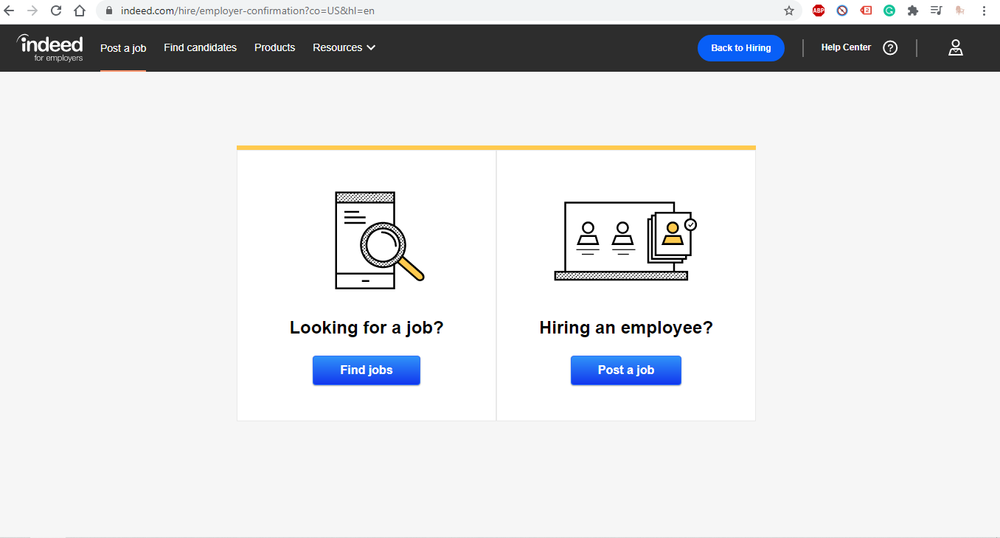
1) Log in to your Indeed account and click “post a job.”
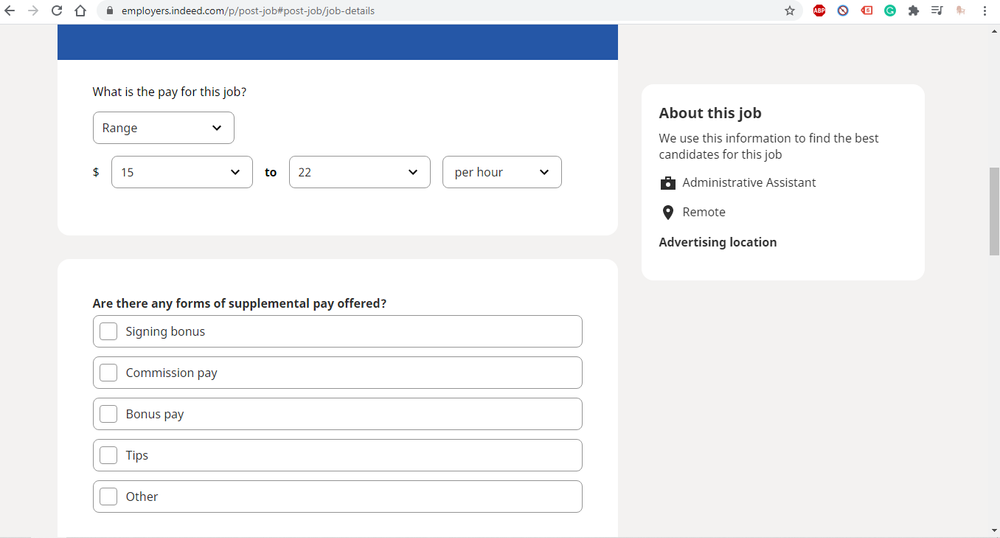
2) Provide basic information about the role, such as the job title, location, and pay.
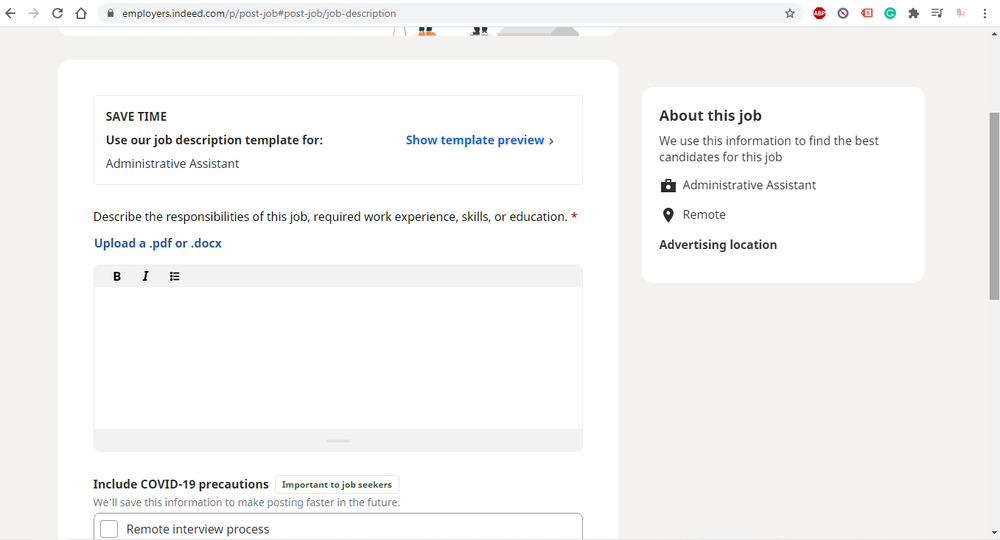
3) Include the job description by uploading a file, writing it in, or using one of Indeed’s templates.
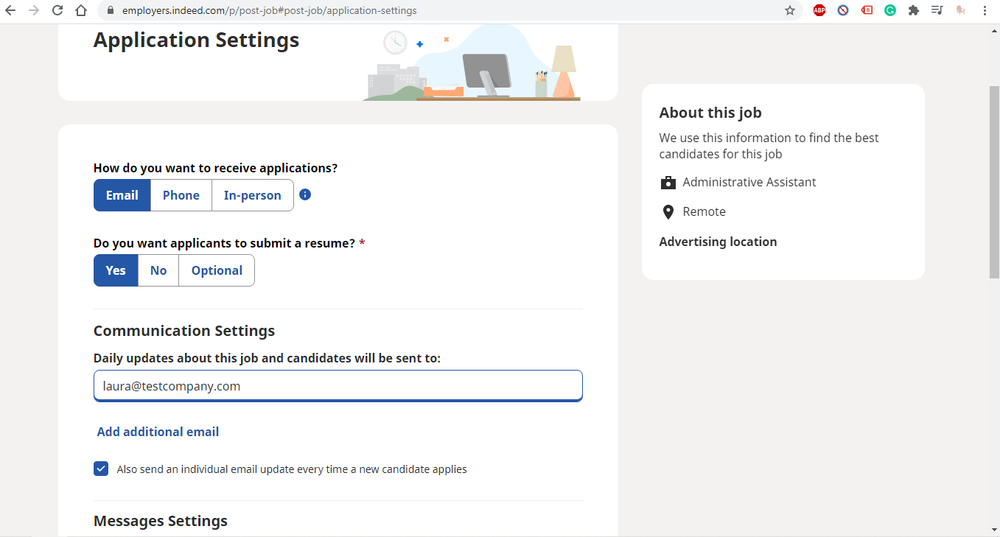
4) Choose your settings, such as who should receive submitted applications.
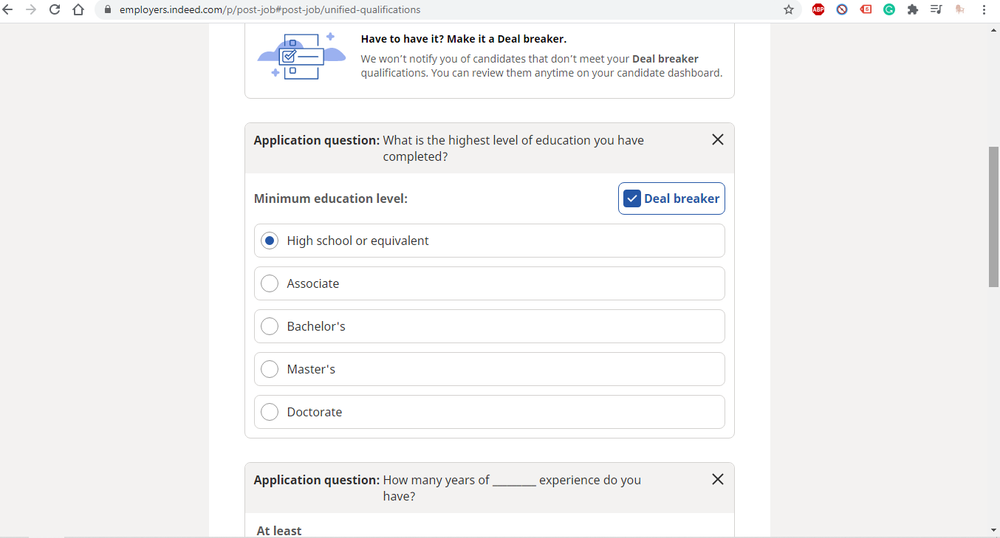
5) Set required qualifications, such as education, experience, and availability, and tell Indeed which ones are deal-breakers. (A deal-breaker is a must-have. If the applicant doesn’t meet a deal-breaker qualification, they don’t move on in the hiring process.)
6) Preview your ad, make any necessary edits, and confirm the post.
7) Click “post without budget.”
That’s it! Your ad should be live within a few hours. You can edit it, pause it, or close it permanently at any time. Now, kick back and wait for the applications to come in.
Post A Sponsored Job Ad Via Indeed Account
If you have the budget, you may want to consider posting a sponsored job. Here are a few reasons why:
-
Free ads gradually lose visibility.
-
Sponsored jobs appear higher in candidate search results.
-
You’ll only pay for performance (per application or per click).
-
Indeed will show you qualified candidates that you can invite to apply via their Instant Match program.
Plus, based on data from Indeed, sponsored jobs are 3.5x more likely to attract your ideal client and result in a filled position.
The process to post a sponsored job ad via your Indeed account follows most of the same steps above. However, when you get to step seven, you’ll answer questions to set your ad budget.
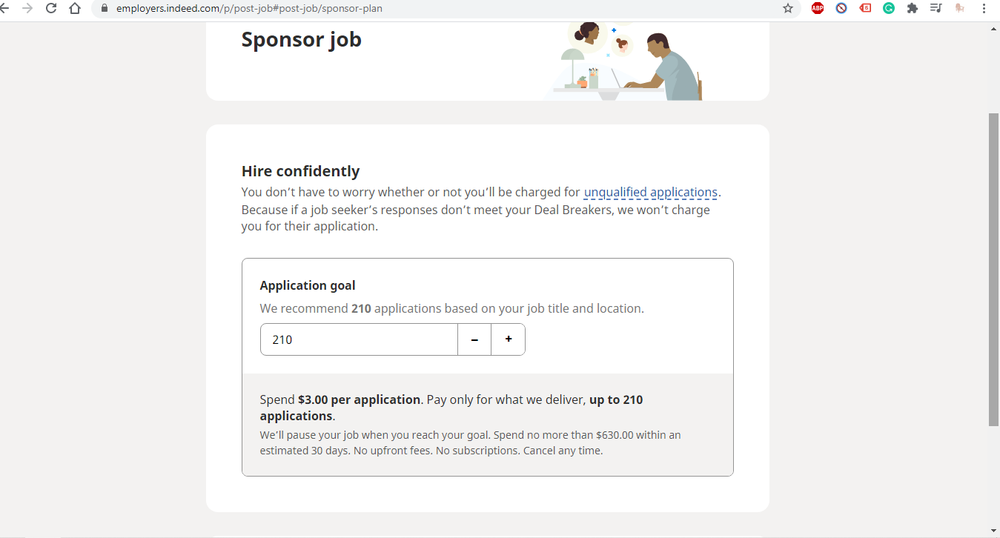
When you post a job for the first time, Indeed may require you to pay per application. If that’s the case, you must be willing to accept anywhere from 50-600 applications per month at $3 per application. Don’t worry, though. You’ll only pay for the number of applications you receive and won’t get charged for submissions that don’t meet your deal-breaker requirements you established in step five.
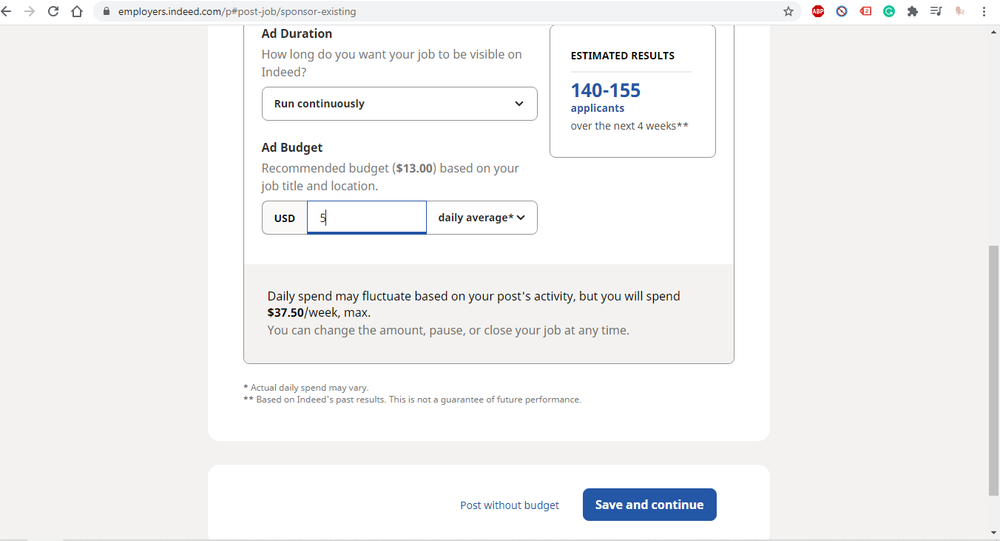
With the pay-per-click model, Indeed will recommend a daily budget based on your job title and location. But, you can set it as low as $5 per day. You can also specify how long you want the ad to run (continuously, 30 days, 14 days, or a custom setting). Based on your budget, Indeed will show you an estimate of how many applications you can expect to receive during that period. You can change your budget whenever you need to.
If you want even more control, you can go into the advanced settings and select a maximum cost per click. Indeed lets you set the amount from $0.25 to $1.50. If you have a daily budget of $5 and set a maximum cost per click of $1, you can expect to receive at least five clicks per day.
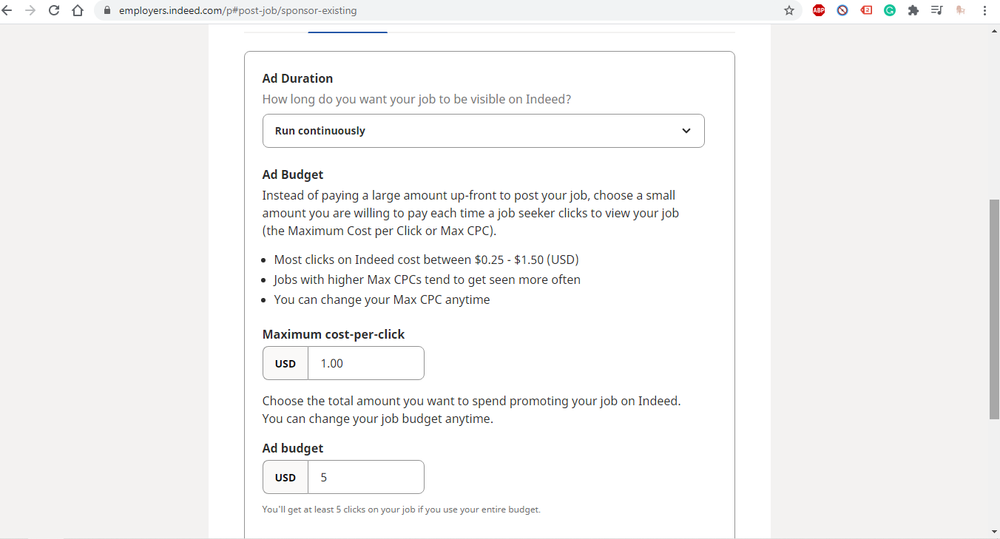
Note: Indeed says that ads with a higher maximum cost per click typically get more views.
Post For Free Via Indeed’s Aggregation Method Or Employer’s ATS
If your firm already has a career website or applicant tracking system, you may not have to post jobs to Indeed manually. With your permission, the company can aggregate your ads and post them to the Indeed website for free. But, aggregation isn’t guaranteed. For the best chance of having your ads picked up by Indeed, each job posted must have:
-
a unique URL
-
separate fields for title and location
-
a detailed job description
-
a button to apply or an email address that accepts applications
You’ll also need to ensure that all postings are respectful, honest, non-discriminatory, and representative of an actual vacancy in your organization (no recruiting to fill a pipeline for future talent needs). To get your jobs aggregated quickly, submit an XML job feed to Indeed. To see where your candidates come from, set up automated source tracking in your applicant tracking system. If your applicant tracking system integrates with Indeed, you’ll already have access to that data.
Post a Sponsored Post From The Employer’s Career Page or ATS
To sponsor a post aggregated from your career page or applicant tracking system, you’ll have to contact Indeed. The company will walk you through the process and provide tailored guidance. Indeed will help you determine which jobs to sponsor and what budget would work best to achieve your desired results.
Indeed Job Posting Pricing
Depending on your organization’s goals and recruiting budget, you could spend hundreds or thousands of dollars per month on sponsored posts. Let’s take a closer look at how this breaks down.
With a pay-per-application arrangement, you’ll pay $3 per application received in a given month. If you end up with 50 applicants, your total cost would be $150.
If you have a pay-per-click set up with simple pricing, you’ll still spend around $150 per month to start. ($5 per day minimum budget X 30 days in a month.)
With advanced pricing, you get to establish a maximum cost per click, ranging from $0.25 to $1.50. While a higher maximum cost per click may increase your post’s visibility, it doesn’t change your established daily budget. So, if your daily budget is $10 and your maximum cost per click is $0.25, you’ll receive at least 40 clicks each day.
Related: Indeed Job Posting Cost
8 Tips For A Great Job Posting On Indeed
To make your job posting stand out on Indeed, follow these best practices:
-
Make each post detailed but scannable using bullet points and short paragraphs.
-
Make each ad engaging by avoiding jargon and being personable.
-
Ensure your ad gives candidates a good sense of what it would be like to work in your company.
-
Include industry-related keywords that job seekers will search for in the job description so your ad will be more visible.
-
List a specific location to improve the post’s search position. You can also tag the role as remote.
-
Anticipate and answer candidate questions about the position, pay, benefits, and company.
-
State the education, experience, and skills requirements early on in the post.
-
Share what makes your firm unique to entice candidates to apply.
If you implement these tips, your odds of attracting top talent go way up!
Frequently Asked Questions
Is it free to post a job on Indeed?
Yes, you can post a job for free on Indeed. To boost your job’s visibility, you can also pay to promote your ad.
How do I post a job posting on Indeed?
To post a job on Indeed, log in to your Indeed account, click on “post a job,” and answer the questions that appear on the screen.
How do I advertise a job on Indeed for free?
To advertise a job on Indeed for free, click on “post a job,” answer the questions that appear on the screen, and click “post without budget.”
How does posting a job on Indeed work?
When you post a job on Indeed, it will be visible to many job seekers. This increased visibility improves your odds of attracting your ideal candidate. Read our Indeed guide for employers.
How does Indeed compare to ZipRecruiter?
We compared all aspects of these two job sites. Read our full review of ZipRecruiter vs Indeed.
The Bottom Line
Armed with the information above, you should feel confident about how to post a job on Indeed. The company makes it easy to list open positions, so your job ads can get to work fast. But, Indeed isn’t the only option you have.
ZipRecruiter can help with all of your hiring needs. If you are ready to add to your team, consider listing your job opening on ZipRecruiter!